
Summary
Overview
Most common sizes
Demo
Compliance
Creatives
Creative template parameters
Features
Limitations
Known issues
Release notes
Overview
The "Tower" creative template displays a vertically floating banner, positioned in the page's side column. When the user scrolls, it remains in viewport within a predefined space.
Most common sizes
Most common RTB sizes of this ad format: 300x250, 200x900, 160x600
Demo
Tower demo
Compliancy
| Criterion | Compliancy |
|---|
| RTB | ✅ |
| Multi-instance | ✅ |
| Creative rotation | ✅ |
| Responsive web design | ✅ |
| Friendly iFrame | ✅ |
| Viewability counting (MRC standard) | ✅ |
Creatives
This section applies for the direct creative template only.
Supported file formats:
- image
- creative script
- HTML5
Note: In case of HTML5 or creative scripts, make sure you set up the size.
Creative template parameters
| Name | Description | Default value |
|---|
| Main options |
| Max ad's container width (px/%) |
Specifies the max. width of the ad's container. Make sure you add the unit, e. g. 750px, 100%.
| 100% |
| Column height (px) |
Specifies the height of the container in which the ad can move. Leave this field empty if you want to have it calculated automatically by the creative template. If this value is smaller than the creative height, it will not be taken into account. In this case, the container will have the height of the creative.
| |
| Vertical offset (px) |
Specifies the vertical offset of the creative (in px).
| 0 |
| Render in Safeframe | Specifies if ad creative will be rendered inside the safeframe. | false |
| Creative feedback | Shows creative feedback button. | true |
| RTB option (only for the RTB template) |
| Acceptable sizes | Acceptable sizes as a coma-separated list of a pair w*h (no spaces) e.g. 300*250,160*600. | |
| Activate ad refresh | Toggle to activate automatic ad refresh functionality (5 refreshes max) | false |
| Viewability threshold (px %) | Specifies what minimum percentage of creative must be visible to be considered for ad refresh. | 50 |
| Duration (seconds) | Specifies for what duration must the ad be visible (provided the tab is active for the entire duration specified) to be considered for ad refresh. | 30 |
Features
The Tower ad format is a vertically floating inline banner typically positioned in the side column. When the user scrolls, it follows and remains in the viewport within the available (predefined) space.
You need to specify the height of the column and leave space for the ad. If none is specified, the ad format will behave like a Default Banner. You can also define the height on insertion level - it is available as a creative template parameter.
This ad format is designed for web only (no mobile web supported).
Click management for HTML5 creatives
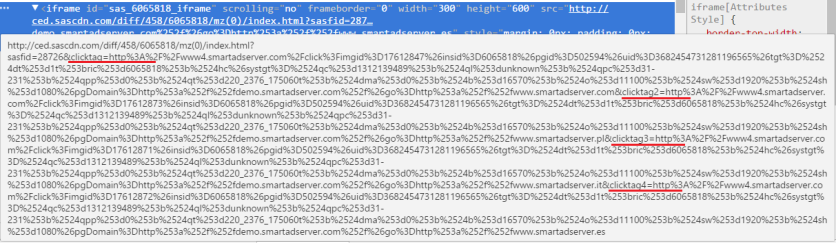
The Tower ad format is able to identify the click destination for HTML5 creatives by using:
- the click counting library
- the clicktag variables passed in the source of the iframe; Important: HTML5 creatives must have the click destination recognition implemented:
Limitations
n/a
Known issues
n/a
Release notes
- 05-03-2025 - Update for action pixels generation
- 11-09-2024 - Fixed feedback button position
- 01-07-2024 - Added support for DSA module. Update Feedback module for Direct and RTB versions
- 15-02-2024 - Allow 10s, 15s values in the "duration" parameter in ad refresh
- 24-01-2024 - Removed support for obsolete macros
- 07-11-2023 - Added ad refresh section to template parameters for RTB version
- 18-07-2023 - Added new RTB macros
- 09-05-2023 - Added SafeFrame, removed Tracking url parameter
- 17-04-2023 - Update sas-libs version to 1.1 and remove document.write from the EMP creative template
- 01-07-2019 - Template is RTB compliant
- 17-12-2018 - Viewability measurement has been implemented
- 09-08-2017 - Add "Column height" parameter


