Summary
OverviewDemoCompliancyCreativesCreative template parametersFeaturesMetricsLimitationsKnown issuesRelease notes
Overview
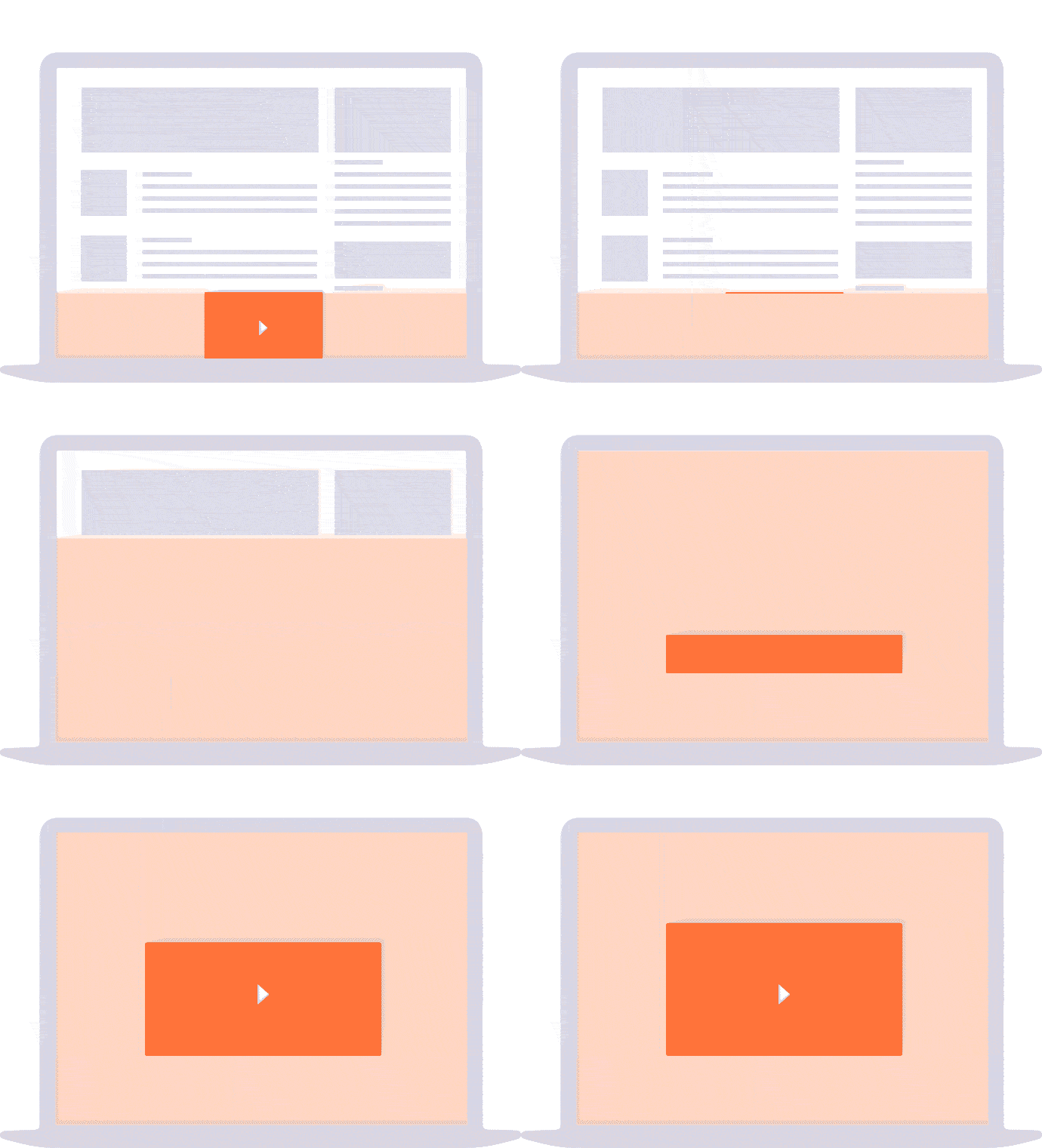
Formerly named "Smart Video-Fold". The "Video fold" creative template displays a bar that sticks at the bottom of the page with a small video player. On mouse over, the ad expands and shows the video in full screen mode.
Demo
Video fold demo
Compliancy
| Criterion | Compliancy |
|---|
| RTB | ❌ |
| VAST 4.2 and lower | ✅ |
| VAST wrapper | ✅ |
| VPAID | ✅ |
| SIMID | ❌ |
| Creative rotation | ✅ |
| Responsive web design | ✅ |
| IFrame buster | ✅ |
| Friendly iFrame | ✅ |
| Viewability counting (MRC standard) | ✅ |
Creatives
- Creative #1: mp4 with resolution/bitrate or any VAST redirect containing the formats: mp4, ogg, webm, javascript (for VPAID only)
- Creative #2: banner next to the small video player; supported file formats: image, creative script, HTML5
- Creative #3: optional background creative in expand mode; supported file formats: image, creative script, HTML5
Note 1: In case of VAST redirects, use the "Paste script" creation method and paste the URL or the entire XML into the "Creative script" field.
Note 2: In case of VAST redirects, the ad format picks the most appropriate file to play according to the following priorities: (1) mp4, (2) webm, (3) ogg, (4) javascript.
Creative template parameters
| Name | Description | Default value |
|---|
| Template options |
| zIndex | zIndex of creative | 9999 |
| Tracking url |
Make sure you add [timestamp] to the URL for cache busting
| |
| Expand/close animation speed |
Specifies the speed of the expand and close animation. Select the "none" value to get no animation at all.
|
fast
|
| Small player width | Specifies the small player width | 250 |
| Small player height | Specifies the small player height | 160 |
| On mouse over unmute | Unmute sound on mouse over
Please notice that the newest version of Chrome and Safari browsers do not allow to programmatically mute / unmute video. In that case video player may be paused instead of muted / unmuted. We recommend to keep this option disabled. | false |
| On mouse out mute | Mute sound on mouse out | false |
| Player options (expand mode) |
| Player width(expand mode) | Specifies the player width in expand mode | 800 |
| Player height(expand mode) | Specifies the player height in expand mode | 600 |
| Vertical offset(expand mode) | Player vertical position; positive number: move to the bottom; number with "-": move to the top | 0 |
| Fullscreen video(expand mode) | Fullscreen video in expand mode? | false |
| Loop video(expand mode) | Specifies if the video will be looped | false |
| Fullscreen button(expand mode) | Specifies if the player will have a fullscreen button | false |
| Pause on tab changing(expand mode) | Stops the video while changing browser tabs | true |
| Play/pause button(expand mode) | Specifies if the player will have play/pause buttons | true |
| Volume button(expand mode) | Specifies if the player will have a volume button | true |
| Controls color(expand mode) | Specifies the color of the controls | #cccccc |
| Duration label(expand mode) |
Specifies the duration label; Note: Use {0} in label to count down the time until the end of the ad
| End of break ads in {0}s |
| Bar mode(expand mode) | Specifies the bar mode | FLOATING |
| Bar opacity(expand mode) | Specifies the opacity of the bar | 0.5 |
| Auto hide(expand mode) | Specifies if the buttons should be hidden after a while; this option works only if the "Bar mode" parameter is set to "FLOATING". | true |
| Buttons options |
| Default close button image | Specifies if the default close button image will appear | true |
| Close button label | Can be text and HTML | |
| Close button link color | Specifies the color of the close link | #000000 |
| Close button link font size | Specifies the size of the close font (in px) | 14 |
| Text label options |
| Label text | Specifies the label which will be over the player | Advertisement |
| Label text font size | Specifies the font size of the label | 12 |
| Label text font color | Specifies the color of the label text | #cccccc |
| Background options |
| Background color (scroller) | Specifies the background color of the scroller | #FFFFFF |
| Background color (expand mode) | Specifies the background color of the expand mode | #FFFFFF |
| Background opacity (expand mode) | Specifies the opacity of the background color (from 0 to 100) in expand mode | 100 |
| Background horizontal offset (expand mode) |
Specifies the horizontal offset of the background file; positive number: to the right side; number with "-": to the left side
| 0 |
| Background vertical offset (expand mode) |
Background file vertical position; positive number: move to the bottom; number with "-": move to the top
| 0 |
| Start expand options |
| Hover over scroller starts expand | Specifies if hovering over scroller starts counting to expand | true |
| Click on scroller starts expand | Specifies if a click on the scroller starts expansion | false |
| Default expand button image | Specifies if the default expand button image will appear | true |
| Expand link text | Can be text and HTML | |
| Expand link color | Specifies the expand link color | #000000 |
| Expand link font size | Specifies the expand link font size | 14 |
Features
Default behavior
- the small video auto-plays in auto-replay mode
- the sound is inactive on mouse hover
- the ad goes into full screen mode on mouse hover
- in full screen mode, the sound is off and the ad is skippable from its beginning; when it finishes, it goes back to main website
Event listening
The Video fold creative template supports the following events:
adBegin,
adDuration,
adEnd and
adError. You can listen to these events to control the functioning of your site.
Any event contains the parameter
formatId to get which formatId (on the page) fired the event:
window.addEventListener('adBegin', function (e) {
    console.log(e.formatId);
});
adBegin / adEndFor instance, if your website has a video player playing video content, you can mute that player when the ad appears and unmute when it disappears:
window.addEventListener('adBegin', function (e) {
    document.querySelector('video').muted = true;
});
adDurationThe
adDuration provides access to the
videoDuration property, which can be useful to retrieve the duration of the whole video ad:
window.addEventListener('adDuration', function (e) {
    console.log(e.videoDuration);
});
adErrorTo take an action when there is an error or the VAST is empty:
window.addEventListener('adError', function (e) {
    console.log("Ad error occured");
});
Force VPAID media files
To update media files selection and prioritize VPAID creatives the sasVpaidFirst variable can be used with a value of true. The below snippet can be added as a custom script:
<script> sasVpaidFirst = true; </script>
Metrics
The small player and data logging start immediately. Data from the small and the big players are summed up.
Also see the
Video metrics article.
Limitations
- works for web only (no mobile web supported).
- the newest versions of Chrome and Safari browsers do not allow to mute / unmute video programmatically. In that case video player may be paused instead of muted / unmuted. We recommend to keep "On mouse over unmute" and "On mouse out mute" options disabled
Known issues
n/a
Release notes
- 25-09-2024 - Add support for OMSDK
- 24-01-2024 - Removed support for obsolete macros
- 05-04-2023 - Update sas-libs version to 1.1
- 27-03-2023 - Select the most appropriate creative encoded version based on bandwidth and resolution
- 13-05-2020 - Remove start muted custom parameter
- 05-02-2019 - Viewability module improvements - Measures are now more accurate and more integrations are covered
- 15-10-2018 - Fix for creatives as creative script
- 16-07-2018 - Fix for the third (optional) creative
- 02-07-2018 - Removed support for flash creatives
- 28-06-2018 - Changed default value of "Start muted" option
- 25-04-2018 - Parse RTB parameters into strings
- 06-03-2018 - Additional RTB parameters in event trackers
- 19-02-2018 - Enable viewability counting by default
- 30-01-2018 - Updated tracking urls
- 24-01-2018 - Code refactoring + VAST4 support
- 22-01-2018 - Updated meta parameters
- 21-12-2017 - Support for creative scripts
- 05-10-2017 - Update for HTML5 player library
- 10-08-2017 - Support for standalone tag


