Overview
The RTB Health tool lets you troubleshoot RTB insertions and deals with a detailed view of the bid status at every step in the auction process.
Access
Direct access
To access RTB Health directly, select
Campaigns > RTB Health from the navigation menu.
Access from a deal
To access
RTB Health from a deal, select
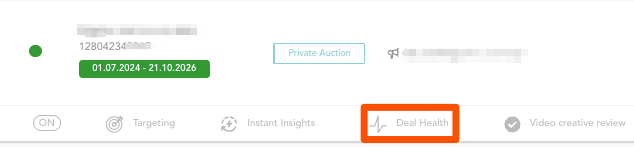
Campaigns > Deals from the navigation menu. Locate the deal and click on the
Deal Health button as shown in the following screenshot:
Data freshness
The data freshness in RTB Health is approx. 10 minutes. In other words, RTB Health shows the metrics and bid statuses from 10 minutes ago. If required, refresh the page to get the latest data.
Filters
You can combine the available filters as follows:
- Deal + Period
- Deal + Buyer seat + Period
- RTB insertion + Partner* + Period
- RTB insertion + Period
- Partner* + Period
* A partner is a SSP, DSP, DSP aggregator or any other technology buying inventory from Equativ's publishers.
Metrics
Definition of basic metrics
The basic metrics used in the RTB Health tool are defined as follows:
- Bid Requests: the bid requests the given deal/insertion sent to the buyer.
- Bids: the offers from buyers on an impression opportunity for a given price. A bid response can return multiple bids (from different buyers) but these are always displayed as one bid. If 0 bids were returned, 0 bids are displayed. If one or more bids were returned, this is displayed as one bid. Due to this behavior, there will never be more bids than bid requests shown in the RTB Health tool.
- Eligible bids: the bids that have not been filtered prior to the competition and are thus eligible.
- Wins: the bids that won the competition—also called server-side impression.
- Impressions: the client-side impressions. The impression pixel which measures the impression is fired by the browser, once the ad is rendered.
Calculated metrics
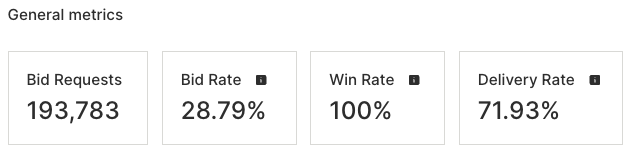
At the top of the page, the RTB Health tool displays the following calculated metrics:
- Bid Requests: the bid requests the deal/insertion sent to the buyers.
- Bid Rate: the bid rate in percent, calculated with the formula: Bids/Bid requests.
- Win Rate: the win rate in percent, calculated with the formula: Wins/Eligible bids.
- Delivery Rate: the delivery rate in percent, calculated with the formula: Impressions/Wins.
Bid status flowchart
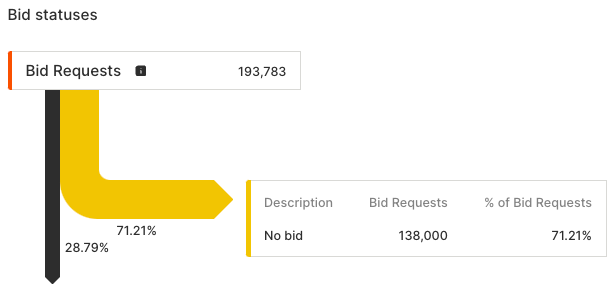
The flowchart displays the following:
- Basic metrics in the auction process: Bid Requests, Bids, Eligible bids, Wins, Impressions.
- Blue bar: the share of each metric that transitioned to the next step in the auction process.
- Orange bar: the share of each metric that did not transition to the next step in the auction process, along with the individual reasons (bid statuses).
ExampleThe following screenshot shows that 28.79% of all Bid requests transitioned to the next step (Bids), whereas 71.21% of all Bid requests resulted in no bids being returned (bid status "No bid").
Bid status
The bid status indicates for which reasons a share of a given metric did not transition to the next step of the auction process. The bid status is key to understand where to start troubleshooting.
The following table lists all bid statuses with a description and suggestions for troubleshooting:
| Bid status______________________________ | Description / troubleshooting suggestions |
|---|
| Bid Requests |
| Bid Outside Private Auction | The auction is private/exclusive and the partner did not respond in a deal. |
| Bid Response DeSerialization Error | The format of the bid response JSON is incorrect. |
| Bid Was On Another Competing Deal | There was a bid by the DSP but not on this deal and potentially from an unrelated buyer. Typically, this occurs when the deal ID does not match in both systems. |
| Invalid web response status | The expected web response status is invalid. Equativ expects either HTTP 200 for offering a bid or HTTP 204 for "No Bid". |
| No Bid | No bid occurred. |
| Time Out | No bid occurred due to a timeout. |
| Web Exception Error | Network communication error (no error code is returned). |
| Bids |
|
| Advertiser Blocked by Equativ | The advertiser has been blocked by Equativ because it is sensitive. |
| Blocked BidResponse | The bid response is blocked by a delivery rule. |
| Blocked By Creative Review Rejected | The creative was blocked due to manual rejection by a user in the Video creative review. |
| Blocked Creative Already Selected | The same creative (identified through the CreativeHashCode) included in the bid response had to be blocked to enforce advertiser exclusivity in the video ad break. |
| Blocked Sensitive Buyer | The buyer has been blocked by Equativ because it is sensitive. |
| Blocked Sensitive Category | The creative has been blocked by Equativ because it belongs to a sensitive category. |
| Blocked Sensitive Creative | The creative has been blocked by Equativ because it is sensitive, for example malware. |
| Blocked Sensitive Creative By ClarityAd | The creative has been blocked by Equativ’s quality tool. |
| Creative Blocked By Error Rate | The creative was blocked automatically, because its error rate was above the defined error rate threshold. For more information, see section "Automatic blocking of bad creatives " in Video creative review. |
| Deal Not Respected | The buyer’s settings do not match with the deal’s parameters. Check with the buyer if the seat id and the advertiser are set up correctly. |
| Invalid Ad markup | The creative markup is incorrect. |
| Invalid Currency | The buyer’s DSP is not bidding in the currency sent in the bid request. |
| Invalid Impression Id | The impression ID in the bid response of the buyer is not matching any impression ID sent by Equativ in the bid request. |
| Invalid Native Ad | The native ad fields do not match. Check with the buyer which fields are used—for example, title, description, or icon—and make sure they are requested accordingly. |
| None | The auction did not result in a winning bid. |
| Unknown Advertiser | The advertiser has been blocked by Equativ, because it is new and not yet audited. Get back to Equativ support to request an audit. |
| Eligible Bids |
| Below (Final) Bid Floor | The bids below the bid floor specified in delivery rules which apply to RTB advertisers or buyers (“post-call delivery rules”, not placement related delivery rules) |
| Below Deal BidFloor | The bids below the bid floor specified in the deal itself. |
| Below Holistic BidFloor | The bids below the bid floor, as calculated by the Holistic Yield algorithm. |
| Below Request BidFloor | The bids below the bid floor included in the bid request (i. e. placement related bid floor). |
| Loss | The bids lost in competition. |
| Loss by CPM per second | The bid has lost the auction due to its video CPM per second. Such losses occur when the bid should have won the auction based on the CPM, but actually lost because the video ad's CPM per second is lower compared to the other bids. |
| Second Price | The bids lost because they were second highest bids. |
| Win |
The potential reasons for Wins not resulting in Impressions include the following:
- Equativ RTB lost against another source of demand (direct, header bidding, mediation, etc.).
- The creative is not compatible with the RTB creative template.
- The RTB creative template is malformed.
- The creative is malformed.
- The video creative is not compatible with the video player.
|


